> ## Documentation Index
> Fetch the complete documentation index at: https://docs.immoteur.com/llms.txt
> Use this file to discover all available pages before exploring further.
# Configure Immoteur webhooks
> Configure an Immoteur webhook and select the data updates that your service receives
Configure a webhook when your service needs classified updates without polling the API. Immoteur sends a JSON `POST` request to the URL configured in your dashboard.
## Choose the updates to receive
Immoteur sends a classified notification when a classified is created or when an eligible normalized field changes. A `meta.lastSeenAt`-only revisit is captured for delta-export reconciliation and does not create a direct live notification.
Use `meta.lastModifiedAt` to identify the latest normalized update and `meta.lastSeenAt` to identify the latest revisit. There is no periodic keep-alive webhook.
## Configure the endpoint
Create a webhook from **Service → Webhooks** in the Immoteur dashboard. Use an HTTPS endpoint that your service controls.
If your endpoint restricts source IPs, allowlist the following Immoteur egress
IPs before testing:{" "}
`51.38.208.80` and `54.37.96.165`{/* immoteur-parameter:end */}.
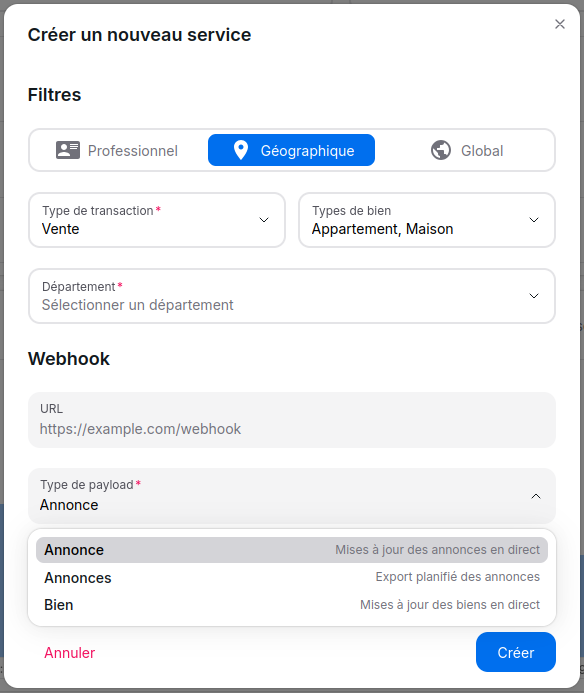 ## Filter the stream
The events your service receives depend on the filters configured on the exporter. Choose one filter type, then keep the payload focused on the market your integration handles.
## Filter the stream
The events your service receives depend on the filters configured on the exporter. Choose one filter type, then keep the payload focused on the market your integration handles.
-
Transaction type (Required)
- Domain source
- Property type
-
SIREN / SIRET (Required)
-
Transaction type (Required)
- Property type
- Seller type
-
Department (Required)
-
Transaction type (Required)
- Domain source
- Property type
- Seller type
## Choose the payload type
| Payload type | Use it for | Contract |
| ----------------------- | -------------------------------- | ------------------------------------------------------------------------------------------------------------- |
| Classified notification | Processing one classified update | The payload is one `Classified` object from `webhooks.classified-notification` in the generated API reference |
| Classified export | Receiving an export in chunks | The payload contains `exportId`, `items`, and `isComplete` from `webhooks.classifieds-export` |
An export can contain multiple deliveries. Do not rely on a fixed item count or delivery order. See [Mirror classified data](./mirror-classified-data) for the full baseline, live update, and delta-reconciliation flow, then read [Webhook delivery, retries, and idempotency](./webhook-delivery) before implementing the receiver.