> ## Documentation Index
> Fetch the complete documentation index at: https://docs.immoteur.com/llms.txt
> Use this file to discover all available pages before exploring further.
# API tokens and data access
> Create, use, and rotate API tokens, then confirm the data access available to your integration
## Create a personal access token
Generate tokens from the Immoteur dashboard under **Settings → API tokens**. Use a token only in the integration that needs it.
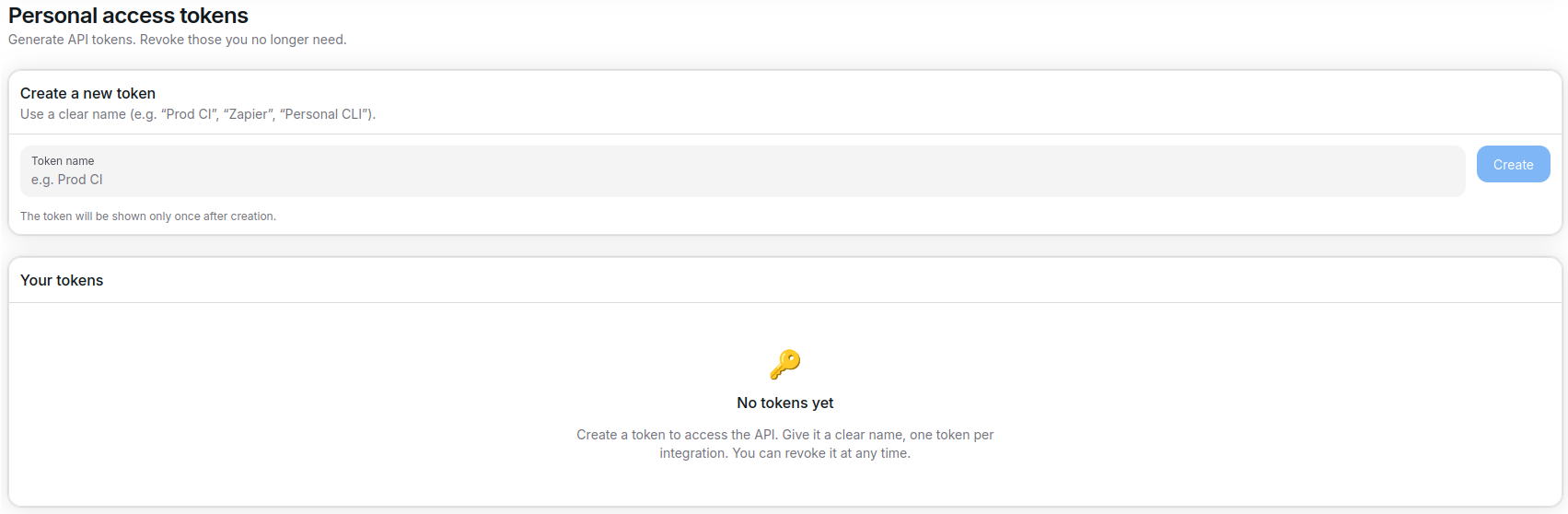 * Copy the token and store it in a secret manager or environment variable.
* Use the bearer format `Authorization: Bearer ` in every API request.
* Rotate tokens regularly and revoke unused credentials to keep integrations secure.
Follow the [Quickstart](./quickstart) to make and verify your first request.
To inspect a token directly, call:
```bash theme={null}
export IMMOTEUR_TOKEN='';
curl --fail-with-body --show-error --silent \
'https://api.immoteur.com/public/v1/auth' \
-H "Authorization: Bearer $IMMOTEUR_TOKEN";
```
## Configure data accesses
Immoteur applies data access limits to API responses. Align the configuration with your agreement so the API returns the data available to your integration.
* Copy the token and store it in a secret manager or environment variable.
* Use the bearer format `Authorization: Bearer ` in every API request.
* Rotate tokens regularly and revoke unused credentials to keep integrations secure.
Follow the [Quickstart](./quickstart) to make and verify your first request.
To inspect a token directly, call:
```bash theme={null}
export IMMOTEUR_TOKEN='';
curl --fail-with-body --show-error --silent \
'https://api.immoteur.com/public/v1/auth' \
-H "Authorization: Bearer $IMMOTEUR_TOKEN";
```
## Configure data accesses
Immoteur applies data access limits to API responses. Align the configuration with your agreement so the API returns the data available to your integration.
 * Review the `meta.dataAccessLimit` block in API responses to confirm the effective access.
* Use endpoint filters in addition to data access limits when you need a narrower result.
## Use tokens safely
* Inject `$IMMOTEUR_TOKEN` through environment variables or a secret store rather than hard-coding it.
* Rotate a token by updating the integration configuration, then revoke the token that is no longer used.
* If a request returns `401`, confirm the token and Bearer header before retrying. See [API reliability](./api-reliability) for response handling.
When you are ready to retrieve data, use [Choose an API resource](./api-resources) to find the relevant endpoint.
* Review the `meta.dataAccessLimit` block in API responses to confirm the effective access.
* Use endpoint filters in addition to data access limits when you need a narrower result.
## Use tokens safely
* Inject `$IMMOTEUR_TOKEN` through environment variables or a secret store rather than hard-coding it.
* Rotate a token by updating the integration configuration, then revoke the token that is no longer used.
* If a request returns `401`, confirm the token and Bearer header before retrying. See [API reliability](./api-reliability) for response handling.
When you are ready to retrieve data, use [Choose an API resource](./api-resources) to find the relevant endpoint.